
mozzeno Credit-as-Payment solution
Enable “Credit as a Payment” on your store with our easy-to-install, regulation-compliant solution. Integrate our JavaScript widgets to display financing options, simulate repayments, and redirect customers to complete their loan application on mozzeno’s platform.
🔥 Ready-Made Plugins (e-commerce platforms)
If you’re running on Shopify, WooCommerce, Magento (Adobe Commerce), PrestaShop or Odoo (eCommerce Module), we’ve got you covered with official, fully-supported plugins:
| Platform | Plugin Link |
|---|---|
| Shopify | Soon available |
| WooCommerce | Available on the WordPress plugin directory |
| Magento (Adobe Commerce) | Soon available |
| PrestaShop | Available on the PrestaShop marketplace |
| Odoo (eCommerce Module) | Soon available |
| Other Platforms | We can evaluate building for your system—contact us at [email protected] |
🛠 DIY Integration
Building your own integration? Use our hosted docs to guide you step by step:
-
Widget Integration
See the full guide and parameter reference here:👉 Widgets
All financing widgets are delivered via our JavaScript library. For details on embedding, parameters, styling and eligibility filters, see our demo page: 👉 Widgets demos -
Events & Webhooks
Synchronize order status with loan application events by configuring webhooks in your mozzeno merchant account and mapping them to your order-management steps.Full event list, payload schema and security guidelines here:👉 Webhooks
-
REST API
For custom workflows—loan status checks, cancellations, delivery notifications—leverage our REST APIs.Browse endpoints, request/response schemas and examples in the REST API catalog:👉 API catalog
Prerequisites
- A mozzeno merchant account with API credentials (branch_id, widget_id's), which can be obtained from [email protected]
- Access to your store’s theme or template files.
- JavaScript enabled on your e-commerce platform, and a developer to perform the integration.
Integration principles
1. Product page (optional but recommended)
- Objective: Display financing information and a simulation modal for a single product.
- Widget: Product or Payment Button widget (click opens built-in simulation modal).
- Logic: Enabling/disabling should be easy , and conditioned based on eligibility criteria (amount, country, customer type: personal/professional,...)
2. Basket / Order summary page (optional)
- Objective: Display financing information and a simulation modal, before checkout for the whole basket.
- Widget: Product or Payment Button widget (click opens built-in simulation modal).
- Logic: Enabling/disabling should be easy , and conditioned based on eligibility criteria (amount, country, customer type: personal/professional,...)
3. Payment method selection page and redirection to mozzeno platform (mandatory)
- Objective: List a payment option “Financement avec mozzeno” / "Financiering met mozzeno" / "Financing with mozzeno" with financing info and simulation modal among other payment options, then redirect purchaser to mozzeno.
- Widget 1: Payment Button widget (click opens built-in simulation modal).
- Widget 2: Redirect widget (opens simulation modal then redirects to mozzeno loan application).
- Logic:
- Enabling/disabling should be easy , and conditioned based on eligibility criteria (amount, country, customer type: personal/professional,...)
- When “mozzeno” is selected as the payment option, redirect the purchaser to mozzeno.
4. Synchronisation of order and stock
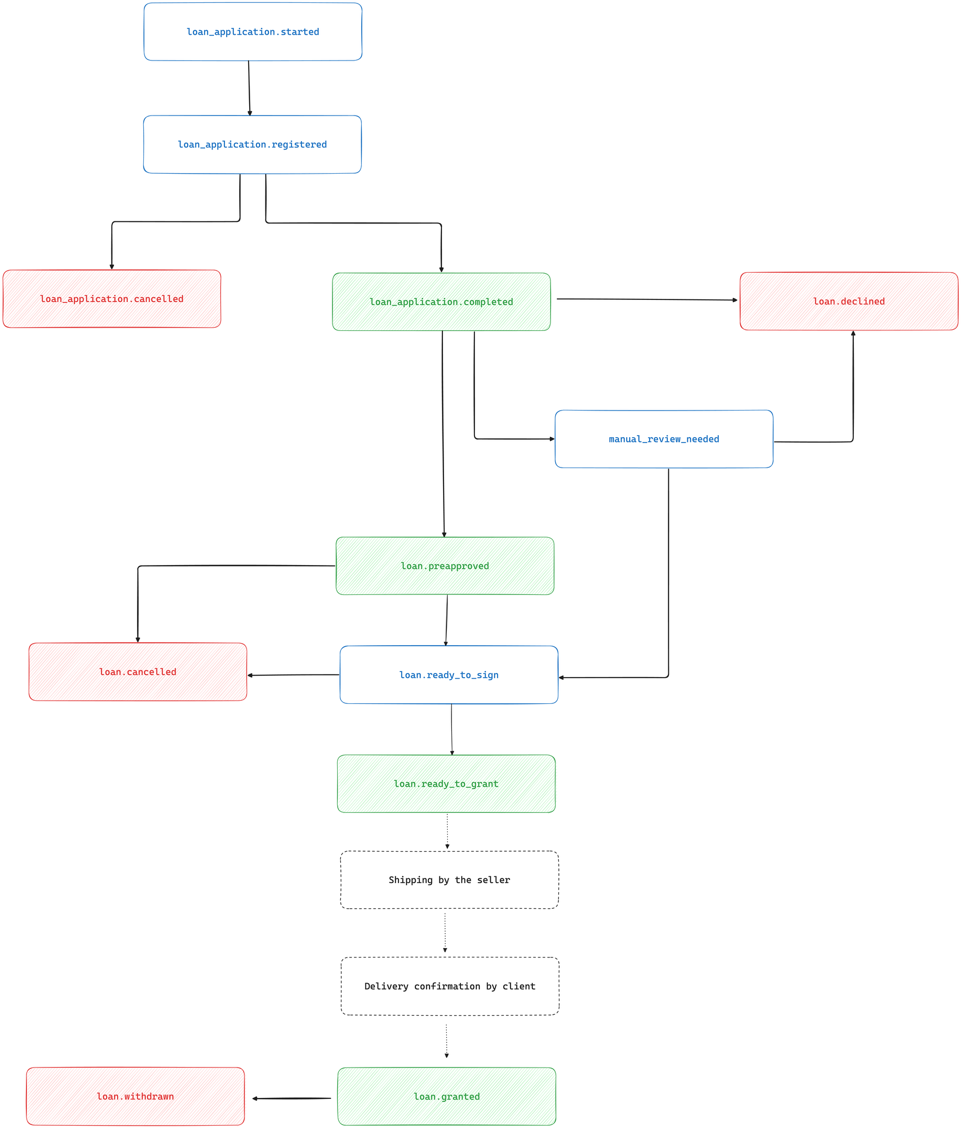
- Objective: Depending on your business and your inventory constraints, you might want to reserve items and release items back to stock on various events in the loan application lifecycle
- Typical reservation & release workflow:
- Reserve items for a customer:
- Immediately when order is placed
- Or at a specific loan event (e.g.
loan_application.completed,loan.preapproved)
- Release items back to stock:
- On decline or cancellation events (
loan.declined,loan_application.cancelled,loan.cancelled, etc.) - Or after a merchant-defined timeout communicated to the customer
- On decline or cancellation events (
- Reserve items for a customer:
- Integration approaches using webhooks:
- All-Events webhook handler
- Dynamically map each event to your order-lifecycle milestones
- Configure reservation/release rules within your ecommerce application
- Filtered webhook endpoints
- Register webhooks URLs for only the events you care about
- Simplifies mapping; follow our webhook guide to set up your endpoints
- All-Events webhook handler
5. Confirmation of the effective delivery
- Objective: In order to confirm the granting of the loan, and pay the merchant, mozzeno needs to get a confirmation that the delivery has effectively occurred. Depending on the business and integration use cases, this notification can be handled through different channels:
- API : merchant system call an API to notify mozzeno that the delivery has occurred
- Delivery confirmation signed by the customer on mozzeno platform
- Delivery attest signed by the customer and provided (by the merchant or the customer) to mozzeno
Loan application lifecycle